Blockspins mobile – browser play, limits and what to check first
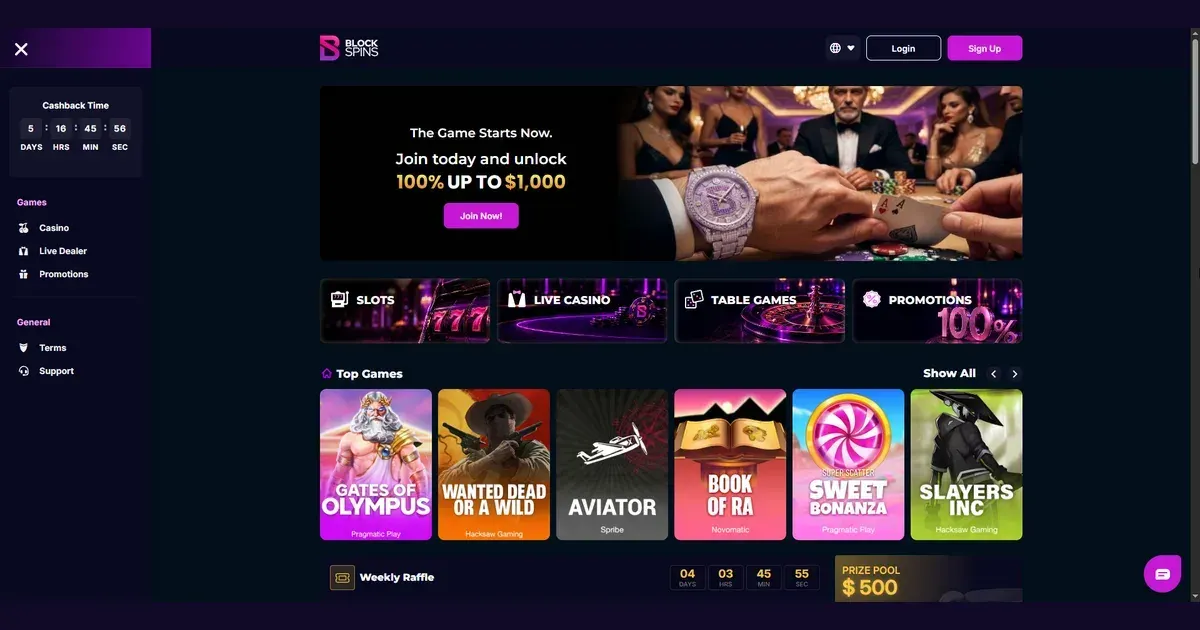















Blockspins runs entirely in your phone's browser. There is no native app to download – you visit the site the same way you would on a laptop, and the same account works across both.
What mobile is like at this operator
The site adapts to smaller screens automatically. You open it in Safari, Chrome or whatever browser your phone uses, and the layout shifts to fit. Navigation compresses into a menu icon, game thumbnails stack vertically, and the cashier and support buttons stay reachable at the bottom of the screen.
Everything loads in the browser tab. No separate app means no store listing, no permissions prompt, and no install size eating into your phone's storage. You bookmark the site or type the address when you want to play.
Installed app versus site in a browser
Blockspins does not offer a native iOS or Android application. What exists is the browser version, and that version is built to work on phones without requiring a download.
The difference matters for a few things:
- No push notifications for new bonuses or tournament results – you check those when you log in.
- The tab stays active only while you are looking at it; switch apps and the session pauses until you return.
- Biometric login depends on your browser's own saved-password feature, not on an app storing your credentials separately.
Browser play keeps your device lighter and means updates happen on the operator's side, not yours. But it also means the tab competes with every other one you have open, and a phone with twelve browser tabs running drains faster than one with a standalone app doing one thing.
Day-to-day use from a phone
You can do most of what the desktop site offers. The lobby loads with filters for slots, live dealer and table games, and the search bar finds specific titles. Game thumbnails are smaller but still readable, and tapping one opens it full-screen in portrait or landscape.
The cashier is accessible from the account menu. Deposit options, withdrawal requests and transaction history all work in the mobile browser. You copy a cryptocurrency wallet address or scan a QR code where the operator provides one, and the same limits apply – a maximum of 7,000 USD equivalent every 24 hours on the way out.
Support reaches you through the live chat button anchored at the screen edge. Typing on a phone keyboard is slower than on a laptop, so keep your question short and have your account email ready if they ask for it.
| Feature | Mobile browser |
|---|---|
| Game library | Full access, same titles as desktop |
| Deposits | Cryptocurrency wallets, no minimum |
| Withdrawals | 7,000 USD equivalent per 24 hours |
| Live chat | Available, anchored at screen edge |
| Verification | Upload held for investigation if suspected rule breach |
Verification happens the same way it does on desktop. The operator markets itself as a no-KYC platform, but the terms allow withdrawal holds for further investigation if third-party tools or bots are suspected. If that happens, you will be asked to provide documents via email to [email protected].
Known limits on a small screen
Some things work less well. Multi-table play in live dealer games becomes cramped – a single table fits comfortably, but switching between two or three means scrolling and losing sight of the first one.
The sportsbook compresses match lists and bet slips into collapsible panels. Placing a single bet is straightforward, but building a combo with twenty selections involves more tapping and scrolling than the same task on a wider screen. The ComboBoost multiplier still applies – it starts at 1.01× for two selections and scales to 2.0× for twenty – but assembling the slip takes longer.
Battery drain becomes noticeable during longer sessions. Live dealer streams and animated slots both demand more power than static content, and a phone already low on charge will not last through an hour of play. Cryptocurrency wallet apps running in parallel – if you are moving funds between them and the casino – add to the load.
Connection matters more on mobile than on a wired desktop. A weak signal interrupts live games mid-hand and can delaybet confirmations in the sportsbook. If a match starts while you are still waiting for the slip to go through, the odds may shift or the market may close.
What to check first before playing on a device you always carry
A phone goes everywhere, which makes it easier to play impulsively and harder to notice how much time or money has gone into a session. Set deposit limits with the operator before you open the site on mobile – they apply across devices, so a cap agreed on desktop holds on your phone too.
- Confirm you are on the operator's actual domain, not a lookalike. Phishing sites often target mobile users because a phone browser shows less of the URL bar.
- Sign out when you finish, especially on a shared device or one a child might pick up. The browser will offer to save your login; decline if others use the phone.
- Check your battery level before a longer session. A phone dying mid-game does not void a live bet, but it does mean you cannot cash out or place the next one until you recharge.
- Keep your connection stable. Switch to Wi-Fi if mobile data is patchy, and avoid playing while moving between coverage zones – a train or a car journey is a poor environment for live dealer or in-play sports betting.
Parental controls such as Net Nanny or Qustodio can block gambling sites on a phone shared with someone under 18. The minimum age to use Blockspins is 18+, and that applies whether you are on a laptop or holding the device in your hand.
Keeping play under control
A phone makes the casino reachable at any hour, which is convenient until it stops being that. If you find yourself opening the site during work, on the bus or late at night without having planned to, that is worth paying attention to.
The operator provides self-exclusion via email to [email protected]. You can close your account for a set period, indefinitely or permanently. Accounts closed permanently forfeit any remaining balance and future cashback or bonus payments, so withdraw what you can before requesting it.
Weekly cashback through the VIP Club is capped at 20,000 USD equivalent, and your VIP level may raise the daily withdrawal limit above the standard 7,000 USD. But neither of those features changes the fact that the site is built to take more money than it pays out – that is how the model works, and a phone in your pocket does not improve your odds.
If gambling is no longer feeling like entertainment, free and confidential support is available in the UK through GamCare at gamcare.org.uk or by calling the National Gambling Helpline on 0808 8020 133, open 24 hours a day. BeGambleAware at begambleaware.org offers practical tools and guidance, and GamStop at gamstop.co.uk provides free self-exclusion across all UK-licensed sites.
Blocking software such as Gamban (gamban.com) and BetBlocker (betblocker.org) works on phones and tablets as well as desktops, and both prevent access to gambling sites at the device level, not just in one browser.
This site is for players aged 18 and over (18+). If play ever stops feeling like a choice, the organisations above are there to help – and reaching out is not an admission of failure, it is the practical thing to do when something is not working.
Last updated:
Frequently asked questions
Does Blockspins have a mobile app for iOS or Android?
No. Blockspins runs in your phone's browser – Safari, Chrome or whichever one you use – and does not offer a native app to download from the App Store or Google Play.
Can I deposit and withdraw using the mobile site?
Yes. The cashier is accessible from the account menu on mobile, and the same cryptocurrency deposit and withdrawal options are available as on desktop. The withdrawal limit is 7,000 USD equivalent per 24 hours.
Do bonuses and wagering requirements work the same way on a phone?
Yes. The 100% welcome bonus up to 1,000 USD equivalent and its 40× turnover requirement apply identically whether you deposit from a phone or a laptop, and the seven-day deadline to clear it runs from the moment you activate it.
What happens if my connection drops during a live game on mobile?
The hand or round continues without you, and the outcome is settled based on the cards or spin result. Reconnecting shows the result in your transaction history, but you cannot act on a game you were disconnected from.
Game Providers